

























All About Arrays in Programming: Indexing, Methods & Operations
Learn all about arrays in programming, including indexing, zero-based indexing, negative indexing, array operations, Python methods, time complexity, and DSA examples.
All About Arrays: Indexing, Operations, Methods, and Everything You Need to Know
If you have started learning programming or preparing for Data Structures and Algorithms (DSA), arrays are one of the first concepts you need to understand properly. They may look simple at first, but a clear understanding of arrays will help you solve problems involving searching, sorting, sliding windows, two pointers, and many other important DSA techniques.
In this guide by Neody IT in collaboration with Lofar Tech, we will explain everything about arrays, from the basics of indexing to array operations, negative indexing, built-in methods, time complexity, and common mistakes. The goal is simple: understand how arrays actually work instead of just memorizing definitions.
1. What Is an Array?
An array is a data structure used to store multiple elements under a single variable name. Instead of creating separate variables for every value, you can store related values together and access them using their positions, known as indexes.
For example, imagine you want to store the marks of five students. You could create five different variables, but that would become difficult to manage if you had hundreds or thousands of students. An array makes this process much easier.
marks = [85, 90, 78, 92, 88]Here, marks contains five values. Each value has a position that allows us to access it individually.
In languages such as C, C++, and Java, traditional arrays generally store elements of the same data type and have a fixed length after creation. Python lists, on the other hand, can store different data types and can grow or shrink dynamically. Although Python lists are commonly used as arrays by beginners, they are technically a different data structure.
In simple words: An array helps you organize multiple values in a structured way so that you can access and process them efficiently.
2. How Does an Array Work?
To understand arrays, imagine a row of boxes. Each box contains a value, and every box has a numbered position. When you want a particular value, you use its position to access the corresponding box.
Consider the following array:
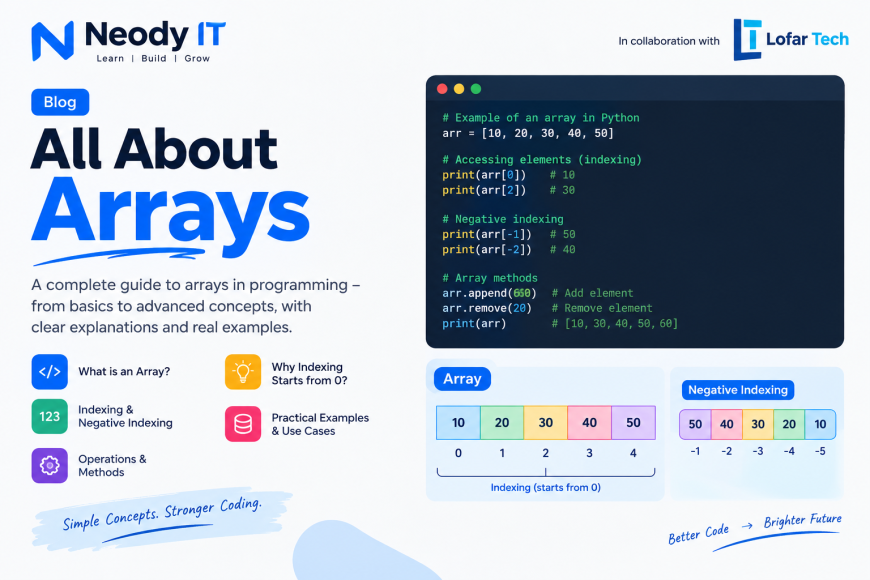
numbers = [10, 20, 30, 40, 50]The elements and their indexes look like this:
| Index | Element |
|---|---|
| 0 | 10 |
| 1 | 20 |
| 2 | 30 |
| 3 | 40 |
| 4 | 50 |
Notice that the first element is stored at index 0, the second at index 1, and so on. This is called zero-based indexing, and it is used by many popular programming languages, including C, C++, Java, JavaScript, and Python.
The important thing to remember is that an element's index represents its position relative to the beginning of the array, starting from zero.
3. What Is Indexing in an Array?
Indexing is the process of accessing an element using its position in a collection. Instead of searching through every element to find a value, you can directly specify the index when you already know the position.
For example, in Python:
numbers = [10, 20, 30, 40, 50]

print(numbers[0])  # Output: 10
print(numbers[2])  # Output: 30
print(numbers[4])  # Output: 50
In this example, numbers[2] returns 30 because the value 30 is located at index 2.
In conventional arrays, accessing an element by a valid index usually takes O(1) time. This means the access time does not grow proportionally with the number of elements in the array.
However, accessing an element by its index is different from searching for an element by its value. If you want to find a particular value without knowing its position, you may need to examine multiple elements. This distinction becomes especially important when analyzing time complexity in DSA.
4. Why Does Indexing Start from 0?
This is one of the most common questions beginners ask. If humans generally start counting positions from 1, why do programming languages often start array indexes from 0?
The answer is closely related to how arrays are represented in memory and how programming languages calculate the location of an element.
4.1 Understanding Memory Addresses
In languages such as C and C++, an array is typically stored in contiguous memory locations. This means its elements occupy consecutive positions in memory.
Suppose the starting memory address of an integer array is 1000 and each integer occupies 4 bytes. The elements would be located at addresses 1000, 1004, 1008, 1012, and 1016, assuming this example's simplified memory layout.
| Index | Element | Example Memory Address |
|---|---|---|
| 0 | 10 | 1000 |
| 1 | 20 | 1004 |
| 2 | 30 | 1008 |
| 3 | 40 | 1012 |
| 4 | 50 | 1016 |
For a conventional array of fixed-size elements, the address of an element can be calculated using this formula:
Address of element = Base address + (Index × Size of each element)If the base address is 1000, each element occupies 4 bytes, and you want the element at index 3, the calculation becomes:
Address = 1000 + (3 × 4)
Address = 1012
Notice that index 0 requires no additional offset from the base address. This makes zero-based indexing a natural fit for address calculations.
4.2 The Connection to Pointer Arithmetic
In C, the expression array[i] is closely related to *(array + i). Here, the offset i is measured in elements rather than raw bytes. Pointer arithmetic automatically accounts for the size of the element type.
Starting at index 0 makes the first element correspond to an offset of zero elements from the beginning of the array.
4.3 Is Memory the Only Reason?
No. Memory layout is an important explanation, but it is not the complete historical story. Zero-based indexing became common partly because of language design traditions and the mathematical convenience of expressing positions as offsets from a starting point.
Also, not every programming language uses zero-based indexing for every collection. For example, MATLAB commonly uses one-based indexing. The indexing convention depends on the language and data structure.
Remember: Zero-based indexing is a convention that fits naturally with offset-based addressing. It does not mean that zero is the first number in ordinary counting.
5. What Is Negative Indexing?
Negative indexing allows you to access elements by counting backward from the end of a sequence. It is supported by Python lists and several other Python sequence types.
Consider this array-like Python list:
numbers = [10, 20, 30, 40, 50]

print(numbers[-1])  # Output: 50
print(numbers[-2])  # Output: 40
print(numbers[-3])  # Output: 30
Here, index -1 refers to the last element, -2 refers to the second-last element, and -3 refers to the third-last element.
| Positive Index | Negative Index | Element |
|---|---|---|
| 0 | -5 | 10 |
| 1 | -4 | 20 |
| 2 | -3 | 30 |
| 3 | -2 | 40 |
| 4 | -1 | 50 |
Negative indexing is useful when you want the last element or a value near the end without calculating the final positive index manually. For example, numbers[-1] is often more convenient than numbers[len(numbers) - 1].
However, negative indexing is not available in every programming language's traditional arrays. Java, C, and C++ do not provide Python-style negative indexing for ordinary arrays. Using a negative index with these arrays is invalid and can lead to errors or undefined behavior.
Important: In Python, accessing an index outside the valid range raises an IndexError. Negative indexing does not mean you can use any negative number.
6. How to Create an Array in Different Programming Languages
The concept of an array remains similar across programming languages, but the syntax, supported operations, and behavior can differ. Let's look at some common examples.
6.1 Arrays in Python
numbers = [10, 20, 30, 40, 50]

print(numbers)
Python lists are flexible and widely used for learning array-based problems. They support indexing, slicing, insertion, deletion, and many built-in methods.
6.2 Arrays in Java
int[] numbers = {10, 20, 30, 40, 50};

System.out.println(numbers[0]);
Java arrays have a fixed length once created. In this example, the array can store five integers, and the first element is available at index 0.
6.3 Arrays in C++
int numbers[] = {10, 20, 30, 40, 50};

cout << numbers[0];
Traditional C++ arrays have a fixed number of elements. C++ also provides containers such as std::vector, which can dynamically grow and offer convenient methods for managing elements.
6.4 Arrays in JavaScript
const numbers = [10, 20, 30, 40, 50];

console.log(numbers[0]);
JavaScript arrays are dynamic and can grow or shrink. Despite being called arrays, JavaScript arrays are objects with behavior that differs from traditional fixed-size arrays in languages such as C and Java.
7. Common Array Operations
Arrays are useful because they allow us to perform different operations on stored data. The most important operations include traversal, insertion, deletion, searching, updating, and sorting.
7.1 Traversal
Traversal means visiting each element of an array, usually to display its values, calculate a result, or process the data.
numbers = [10, 20, 30, 40, 50]

for number in numbers:
    print(number)
The loop visits every element once. If the array contains n elements, traversal generally takes O(n) time.
7.2 Insertion
Insertion means adding a new element to an array or array-like collection. In a Python list, you can use append() to add an element at the end or insert() to add it at a particular position.
numbers = [10, 20, 30]

numbers.append(40)
print(numbers)

# Output: [10, 20, 30, 40]

numbers.insert(1, 15)
print(numbers)

# Output: [10, 15, 20, 30, 40]
Appending to a Python list takes amortized O(1) time, although an individual append can take O(n) time when the underlying storage needs to grow. Inserting at the beginning or middle usually takes O(n) time because existing elements may need to shift.
In a traditional fixed-size array, insertion may require creating a larger array or moving elements, depending on the available capacity and position.
7.3 Deletion
Deletion means removing an element from a collection. Python lists provide methods such as remove() and pop().
numbers = [10, 20, 30, 40, 50]

numbers.remove(30)
print(numbers)

# Output: [10, 20, 40, 50]

removed = numbers.pop(1)
print(removed)

# Output: 20

print(numbers)

# Output: [10, 40, 50]
The remove() method deletes the first matching value, whereas pop() removes and returns the element at a specified index. Calling pop() without an index removes the last element.
Removing an element from the middle or beginning of a Python list generally takes O(n) time because subsequent elements must shift. Removing the last element is typically O(1).
7.4 Searching
Searching means finding whether a particular value exists in an array and, if needed, determining its position.
numbers = [10, 20, 30, 40, 50]

target = 30

if target in numbers:
    print("Element found")
else:
    print("Element not found")
In an unsorted collection, a simple search may need to examine every element. Linear search therefore has O(n) worst-case time complexity.
If the array is sorted, binary search can find an element in O(log n) time, provided the data structure and implementation support efficient access to the middle element. For arrays, this condition is generally satisfied.
7.5 Updating an Element
Updating means changing the value stored at a particular index.
numbers = [10, 20, 30, 40, 50]

numbers[2] = 35

print(numbers)

# Output: [10, 20, 35, 40, 50]
Here, the value at index 2 changes from 30 to 35. Updating an element by index in an ordinary array or Python list takes O(1) time.
7.6 Sorting
Sorting means arranging elements in ascending or descending order. It is useful when working with rankings, marks, prices, search results, and many algorithmic problems.
numbers = [40, 10, 50, 20, 30]

numbers.sort()

print(numbers)

# Output: [10, 20, 30, 40, 50]
Python's built-in list sorting method uses Timsort and has O(n log n) worst-case time complexity. Sorting performance depends on the algorithm and the programming language being used.
8. Important Array Methods in Python
Python lists provide several built-in methods that make common operations easier. Here are some of the methods beginners should understand first.
| Method | Purpose | Example |
|---|---|---|
append(x) |
Adds an element to the end. | numbers.append(60) |
extend(iterable) |
Adds elements from another iterable. | numbers.extend([60, 70]) |
insert(i, x) |
Inserts a value at a specified position. | numbers.insert(1, 15) |
remove(x) |
Removes the first matching value. | numbers.remove(20) |
pop(i) |
Removes and returns an element. | numbers.pop(2) |
index(x) |
Returns the index of the first matching value. | numbers.index(30) |
count(x) |
Counts occurrences of a value. | numbers.count(10) |
sort() |
Sorts the list in place. | numbers.sort() |
reverse() |
Reverses the list in place. | numbers.reverse() |
copy() |
Creates a shallow copy of the list. | new_list = numbers.copy() |
clear() |
Removes all elements. | numbers.clear() |
Remember that these are Python list methods, not universal methods available on traditional arrays in every programming language. For example, Java arrays do not have an append() method because their length cannot change after creation.
8.1 The Difference Between append() and extend()
Beginners often confuse these two methods because both can add information to a list. The difference becomes clear with an example.
numbers = [1, 2, 3]

numbers.append([4, 5])
print(numbers)

# Output: [1, 2, 3, [4, 5]]

numbers = [1, 2, 3]

numbers.extend([4, 5])
print(numbers)

# Output: [1, 2, 3, 4, 5]
append() adds its argument as a single element. extend() adds the elements from an iterable individually. This difference matters when building lists dynamically.
8.2 The Difference Between sort() and sorted()
numbers = [30, 10, 20]

numbers.sort()
print(numbers)

# Output: [10, 20, 30]

numbers = [30, 10, 20]

result = sorted(numbers)

print(result)
print(numbers)

# Output:
# [10, 20, 30]
# [30, 10, 20]
The sort() method modifies the original list and returns None. The sorted() function creates and returns a new sorted list, leaving the original list unchanged.
9. What Is Array Slicing?
Slicing allows you to retrieve a portion of a sequence without accessing each element individually. In Python, the basic syntax is:
list_name[start:stop:step]The start index identifies where the slice begins. The stop index identifies where it ends, but the element at that index is excluded. The optional step determines how many positions to move between selected elements.
numbers = [10, 20, 30, 40, 50, 60]

print(numbers[1:4])
# Output: [20, 30, 40]

print(numbers[:3])
# Output: [10, 20, 30]

print(numbers[3:])
# Output: [40, 50, 60]

print(numbers[::2])
# Output: [10, 30, 50]

print(numbers[::-1])
# Output: [60, 50, 40, 30, 20, 10]
Slicing is useful for extracting sublists, reversing sequences, and processing data in smaller sections. For a Python list, ordinary slicing creates a new list, which requires additional memory for the resulting elements.
10. Time Complexity of Array Operations
If you are learning DSA, understanding time complexity is just as important as understanding how an array works. Time complexity describes how the amount of work required by an operation grows as the input size increases.
The following table gives typical time complexities for common operations on arrays and Python lists. Exact performance depends on the language, implementation, and operation being performed.
| Operation | Typical Time Complexity |
|---|---|
| Access element by index | O(1) |
| Update element by index | O(1) |
| Traverse all elements | O(n) |
| Linear search | O(n) |
| Binary search on a sorted array | O(log n) |
| Insert at the beginning or middle | O(n) |
| Delete from the beginning or middle | O(n) |
| Append to a dynamic array | Amortized O(1) |
| Sort using an efficient comparison sort | Typically O(n log n) |
Here, n represents the number of elements. O(1) means constant time, O(n) means linear time, and O(log n) means logarithmic time. These notations describe growth rates rather than exact execution times in seconds.
Why does this matter? Suppose you have one million elements. Accessing the element at a known index is still a constant-time operation in a conventional array. Searching for an unknown value, however, may require examining a large portion of those elements.
11. Common Array Mistakes Beginners Make
Understanding arrays also means knowing where things can go wrong. Many beginner programming errors come from small misunderstandings about indexes and operations.
11.1 Accessing an Invalid Index
numbers = [10, 20, 30]

print(numbers[3])
This code raises an IndexError in Python because the valid indexes are 0, 1, and 2. An array containing three elements does not have a valid index of 3.
11.2 Confusing an Index with a Value
numbers = [10, 20, 30, 40]

print(numbers[2])  # Output: 30
The number 2 represents the index, not the value being requested. The program returns the element stored at that position, which is 30.
11.3 Assuming Every Language Supports Negative Indexing
Python allows you to access the final element using numbers[-1]. Traditional arrays in Java, C, and C++ do not provide the same behavior. Always check the indexing rules of the language you are using.
11.4 Forgetting That Insertion Can Shift Elements
Adding an element to the beginning of an array-like list may require moving existing elements to make room. This is why insertion at an arbitrary position is generally more expensive than accessing an element by index.
11.5 Modifying a List While Iterating Over It
Removing elements from a list while iterating over it can cause elements to be skipped because their positions change. A safer approach is to build a new list or iterate over a copy when necessary.
numbers = [10, 20, 30, 40, 50]

even_numbers = [n for n in numbers if n % 20 == 0]

print(even_numbers)

# Output: [20, 40]
This example creates a new list containing values divisible by 20 without modifying the original list during iteration.
12. Where Are Arrays Used in Real Life?
Arrays are not limited to coding exercises. They are used throughout software development and computer science because programs frequently need to organize and process collections of information.
- Student Management Systems: Storing marks, attendance records, and other collections of student information.
- Image Processing: Representing image data as grids of pixel values, often using multidimensional arrays.
- Data Analysis: Processing numerical datasets, measurements, and statistical values.
- Game Development: Managing grids, board positions, player statistics, and collections of game objects.
- Machine Learning: Representing numerical data, model parameters, and tensors through arrays and related structures.
- Web Development: Processing API responses, product lists, user records, and collections of application data.
For example, an online store may receive a list of products from its backend API. The frontend can iterate over that collection and display each product as a separate card. Similarly, a student dashboard can process a collection of marks to calculate totals and averages.
The underlying idea is the same: organize multiple values into a collection so that the program can process them systematically.
13. What Are Multidimensional Arrays?
A multidimensional array organizes data using more than one index. A two-dimensional array is commonly used to represent rows and columns, much like a table or a matrix.
matrix = [
    [1, 2, 3],
    [4, 5, 6],
    [7, 8, 9]
]

print(matrix[0][0])  # Output: 1
print(matrix[1][2])  # Output: 6
print(matrix[2][1])  # Output: 8
In this example, matrix[1][2] accesses the element in the second row and third column. Both indexes use zero-based indexing.
Multidimensional arrays are useful for matrices, game boards, spreadsheets, scientific calculations, and image data. Some languages support multidimensional arrays directly, while others commonly represent them using arrays of arrays.
14. Arrays vs. Linked Lists
Arrays and linked lists both store collections of elements, but they organize their data differently. Understanding this difference helps you choose the right data structure for a particular problem.
| Feature | Array | Linked List |
|---|---|---|
| Memory organization | Consecutive storage in conventional arrays | Nodes can be located in different memory locations |
| Access by index | O(1) for conventional arrays | O(n) for a singly linked list |
| Insertion at the beginning | Usually O(n) when elements must shift | O(1) when a head pointer is available |
| Memory overhead | Generally lower for simple arrays | Additional memory is required for links |
| Cache performance | Often better because elements are stored contiguously | Often less predictable because nodes may be scattered |
Arrays are often a good choice when you need fast indexed access. Linked lists can be useful when frequent insertions or deletions at known node positions are important, although locating those positions may still require traversal.
The best choice depends on the workload, memory requirements, and operations your application performs most frequently.
15. How to Start Practicing Array Problems in DSA
Once you understand the basic concepts, the next step is to solve problems. Reading definitions is useful, but arrays become much easier to understand when you use them to solve actual programming challenges.
Start with these problems in the following order:
- Print every element of an array.
- Find the sum and average of all elements.
- Find the maximum and minimum values.
- Search for a particular element.
- Reverse an array.
- Count the frequency of a given value.
- Remove duplicate values from a sorted array.
- Move all zeroes to the end of an array.
- Find the second-largest distinct element.
- Practice two-pointer and sliding-window problems.
Do not rush directly into advanced questions. Make sure you understand indexing, loops, element updates, and the time complexity of your solution before moving to more challenging problems.
When solving each problem, ask yourself three questions: What is the input? What output is expected? What is the most efficient way to solve it?
These questions will help you develop problem-solving skills instead of relying only on memorized solutions.
16. Frequently Asked Questions About Arrays
What is an array in programming?
An array is a data structure that organizes multiple elements into a collection. Conventional arrays typically store elements of the same type in contiguous memory, while array-like structures in languages such as Python and JavaScript can behave differently.
Why does array indexing start from zero?
Zero-based indexing treats an element's index as an offset from the beginning of the array. In conventional arrays, the first element has an offset of zero, which fits naturally with memory address calculations. Language design and historical conventions also contributed to its widespread use.
What is the difference between indexing and slicing?
Indexing retrieves an individual element, while slicing retrieves a portion of a sequence. For example, numbers[2] returns one element, whereas numbers[1:4] returns a sequence of elements from index 1 up to, but not including, index 4.
What is negative indexing?
Negative indexing allows you to access elements by counting backward from the end of a sequence. In Python, index -1 refers to the last element, -2 to the second-last element, and so on.
Is accessing an array element O(1)?
Accessing an element by a valid index in a conventional array takes O(1) time. Python list indexing also takes O(1) time. This does not mean searching for an unknown value is O(1); linear search generally takes O(n) time in an unsorted array.
Can an array store different data types?
It depends on the language and data structure. Traditional arrays in C, C++, and Java generally store elements of a specified type. Python lists and JavaScript arrays can hold values of different types.
Are arrays and Python lists the same?
Not exactly. Python lists are dynamic collections that support different data types. Traditional arrays commonly have a fixed length and store elements of a particular type. Python also provides an array module for typed arrays and supports numerical arrays through libraries such as NumPy.
What should I learn after arrays?
After learning arrays, practice strings, searching, sorting, two pointers, sliding windows, linked lists, stacks, and queues. Arrays also provide the foundation for many advanced DSA problems.
Conclusion: Arrays Are Simple, but Understanding Them Matters
Arrays are among the most important data structures in programming. They help organize collections of values and provide fast access to individual elements through indexing. Once you understand how indexing, negative indexing, insertion, deletion, searching, and sorting work, many programming problems become easier to approach.
The key is not to memorize every method or complexity table. Understand why accessing an element by index is efficient, why inserting into the middle can require shifting elements, and how these operations affect the performance of your program.
If you are preparing for coding interviews or starting your DSA journey, spend time implementing basic array operations yourself. Then gradually move to searching, sorting, two-pointer techniques, and sliding-window problems.
This article is brought to you by Neody IT in collaboration with Lofar Tech, with the aim of making programming concepts easier to understand through practical explanations.
Keep learning, keep building, and focus on understanding the logic behind the code.
What's Your Reaction?
 Like
0
Like
0
 Dislike
0
Dislike
0
 Love
0
Love
0
 Funny
0
Funny
0
 Angry
0
Angry
0
 Sad
0
Sad
0
 Wow
0
Wow
0